

TL;DR: Survey polls let your group vote on text options instead of time slots. Add images, descriptions, and location pins to each option. Attach surveys as follow-ups to scheduling polls for a complete group decision making workflow, all under one shared link with a shared chat.
Most group decisions are not about “when.” They are about “where,” “what,” or “which one.” After you lock in a date, the real discussion begins: Which restaurant? What should we bring? Where exactly are we meeting? These questions usually spiral into group chats that end with someone saying “I don’t care, just pick something.”
That is where survey polls come in. Timergy is not just a scheduling tool. It is a voting tool for every decision your group needs to make.
What Is a Survey Poll?
A survey poll works like a scheduling poll, but with text options instead of time slots. You write out the choices, your group votes Yes, Maybe, or No on each one, and the results show you what everyone actually wants.
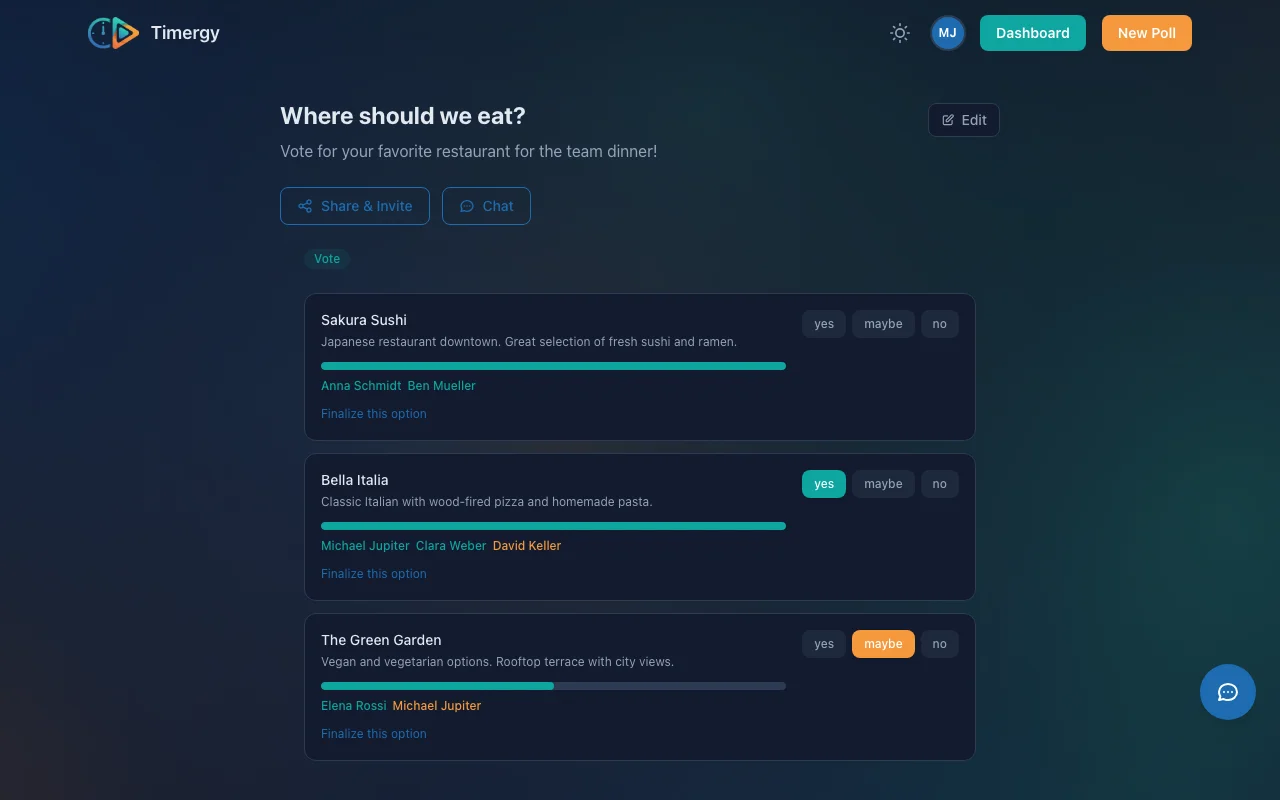
It sounds simple, and it is. But the difference between “texting options in a chat” and “running a proper poll” is night and day. No opinions get lost, no one dominates the conversation, and you get a clear, visual result instead of scrolling through 47 messages.
Use Cases for Survey Polls
Survey polls are flexible enough for almost any group decision. Here are a few examples that come up all the time:
- Which restaurant? List 4-5 options with photos and price range in the description. Everyone votes, the winner is obvious. No more “I’m fine with anything” followed by vetoing every suggestion.
- What gift should we get? Planning a group gift for a colleague or friend? Create options like “Noise-cancelling headphones,” “Cooking class voucher,” or “Weekend trip fund” and let the group decide together.
- Travel destination? Compare cities or vacation spots with photos, estimated costs, and actual map pins showing where each place is.
- Party theme? ”80s disco,” “Garden party,” or “Game night”? Add mood-board images to each option so people know what they are voting for.
Any decision where a group needs to weigh in works as a survey poll. It replaces the chaos of group chats with a structured, visual vote.
Rich Options: More Than Just Text
Every option in a survey poll can carry more context than a simple title.
Descriptions let you add details that help people make informed choices. For a restaurant poll, include the cuisine type, price range, and whether they take reservations. For gift ideas, add a link or a rough price estimate. For travel destinations, note the flight time or budget per person.
Image upload works directly from your phone or desktop. Timergy handles client-side resizing automatically, compressing images to WebP format at a maximum of 300KB. This means photos load fast even on slow mobile connections, without you having to worry about file sizes. Tap any image thumbnail to open a full-size lightbox for a closer look.
Location pins let you drop a map marker on each option. This is especially useful for restaurant polls or venue comparisons. Instead of pasting Google Maps links into a group chat, participants see every location on a map right inside the poll. For travel destination polls, pins make it easy to visualize how far apart the options are.
Yes/Maybe/No Voting with Aggregated Results
Survey polls use the same proven voting system as Timergy’s scheduling polls. Each participant votes Yes, Maybe, or No on every option. Results are displayed with color-coded names (green for Yes, yellow for Maybe, red for No), making it easy to spot the winner at a glance.
The “Maybe” option captures the nuance that binary polls miss. Someone might love Option A but also be okay with Option B. That information matters when you are trying to find the choice that works for the most people, not just the one with the loudest supporters.
For simpler decisions where you need clear-cut answers, you can switch to Yes/No only mode.
Linked Polls: First the Date, Then the Details
Here is where survey polls become truly powerful. Instead of creating standalone polls, you can attach them as follow-up questions to an existing scheduling poll.
A typical event planning flow looks like this:
- Scheduling poll: “When should we have the team dinner?” (find the date)
- Survey poll: “Which restaurant?” (find the place)
- Task list: “Who brings what?” (divide responsibilities)
All three live under one shared link. Participants answer everything in one place, with no separate links, no context switching, and no confusion about which poll is which.
The linked polls also share a single chat, so all discussion stays in one thread. No more cross-referencing between different group chats or losing context when someone replies to the wrong message.
This connected approach to group decision making is something no other scheduling tool offers. You can read more about how survey polls and task lists launched in the original announcement.
Real-World Example: Planning a Birthday Dinner
Let’s walk through a realistic scenario. Your friend’s birthday is coming up and you are organizing dinner for a group of ten.
Step 1: Create a scheduling poll with five evening options across two weekends. Share the link. Everyone votes, and Friday the 14th wins.
Step 2: Attach a survey poll asking “Which restaurant?” with four options. Each option has a photo, the cuisine type in the description, the price range, and a location pin on the map. The group votes, and the Italian place downtown wins with 7 Yes votes.
Step 3: Attach a task list for “Who handles what?” with items like “Book the table (1 person),” “Organize the gift (2 people),” and “Make the playlist (1 person).” People claim tasks, and nothing falls through the cracks.
One link, three decisions, zero group chat chaos.
Get Started with Survey Polls
Survey polls are free for everyone. Create one now and share the link with your group. No account required for participants, and voting works on any device.
For teams and organizers who need calendar integration, SMS reminders, or paid event bookings, check out Timergy Pro.