

TL;DR: Timergy’s Branding Studio lets you customize everything: logos, colors, fonts, vote colors, banners, favicons, and even confirmation emails. Apply different branding per context (polls, sign-up sheets, booking pages) and preview changes in real time. It’s the most comprehensive custom branding system in any scheduling tool.
Your scheduling tool shows up in every meeting invite, every booking confirmation, and every poll you share. It’s a touchpoint with your audience. So why does it look like someone else’s product?
Most scheduling tools give you an accent color picker and call it “branding.” Timergy gives you a full Branding Studio that turns your polls, sign-up sheets, and booking pages into extensions of your own brand. If you’ve been looking for a white label scheduling solution, this is it.
What the Branding Studio Offers
Timergy has the most comprehensive customization system of any scheduling tool on the market. While Calendly and Cal.com limit you to a logo and a single brand color, Timergy lets you control every visual detail your participants see. Here’s what you can customize.
Logo Upload (Light + Dark Mode)
Upload two versions of your logo: one for light backgrounds, one for dark. Timergy automatically switches between them depending on the viewer’s system preference. No more washed-out logos on dark screens or invisible logos on white backgrounds. Supported formats include PNG, SVG, and WebP.
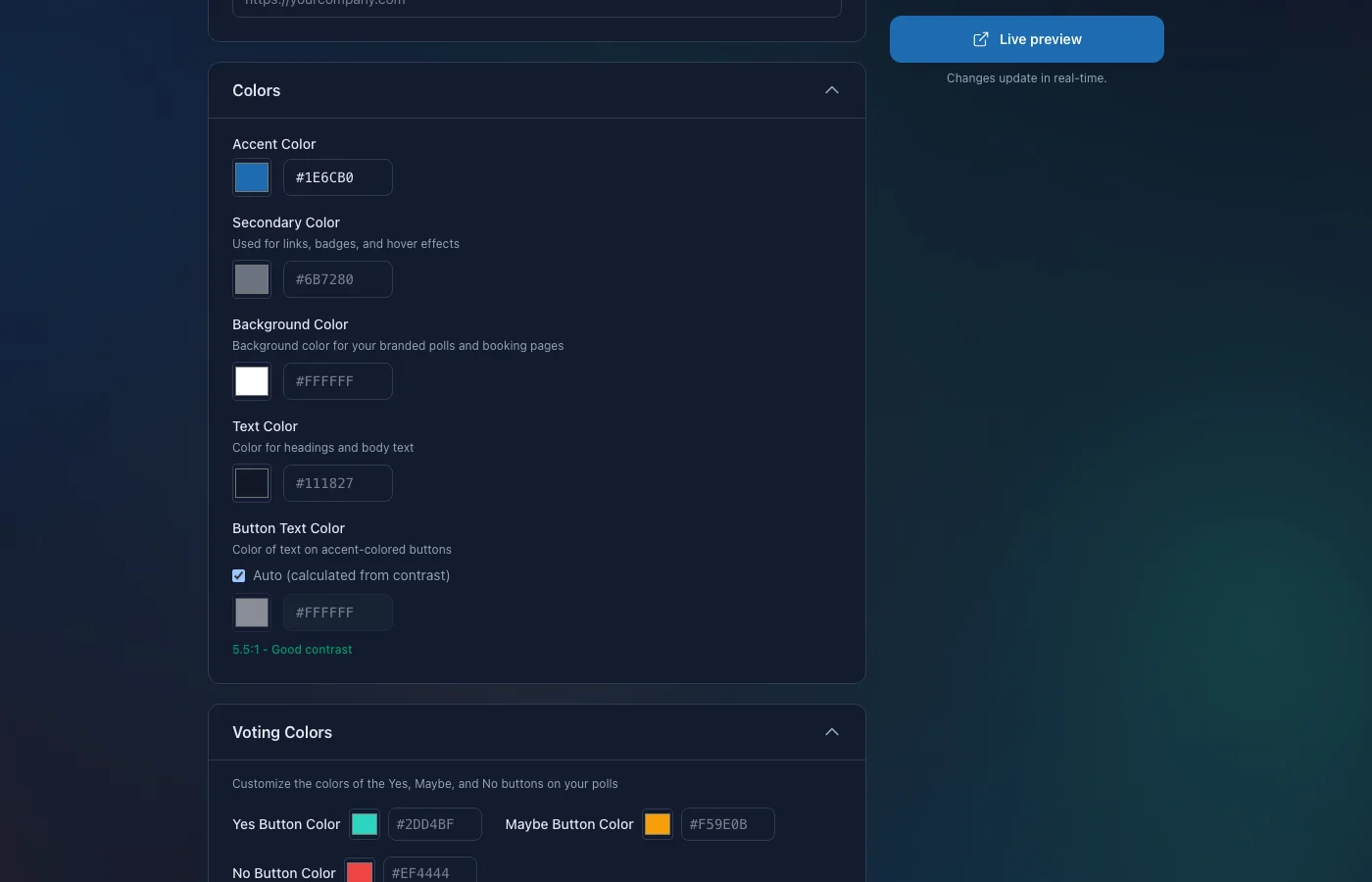
Full Color Control
Forget picking a single “brand color.” The Branding Studio gives you granular control over:
- Accent color: Primary buttons, links, and highlights
- Secondary color: Supporting UI elements and badges
- Background color: Page background for your polls and booking pages
- Text color: Body text and headings
- Button colors: Separate control for button backgrounds and button text
This means your branded booking page can match your website pixel for pixel. Participants won’t even realize they’ve left your site.
Custom Font from Google Fonts
Pick any font from the entire Google Fonts library, over 1,500 families. Whether your brand uses Inter, Poppins, Playfair Display, or something more distinctive, Timergy renders your polls and booking pages in your typeface. Type a name, pick from the autocomplete list, and the preview updates instantly. This is a detail no other scheduling tool offers.
Custom Vote Colors
This one is unique to Timergy. By default, votes use green (Yes), yellow (Maybe), and red (No). With the Branding Studio, you can replace these with any colors that fit your brand palette.
Running a corporate poll? Use your company’s green and grey. Planning a wedding? Match your event’s color scheme down to the vote buttons. This is especially useful for organizations with strict brand guidelines where specific greens or reds carry meaning. Your participants still get an intuitive visual system, just in your colors.
Banner Image and Favicon
Upload a banner image that appears at the top of your polls, sign-up sheets, or booking pages. Use it for event artwork, team photos, or seasonal branding. The banner adapts responsively across desktop and mobile.
Add a custom favicon so browser tabs show your logo instead of Timergy’s. A small detail, but participants who bookmark your scheduling link will see your brand, not ours.
Remove “Powered by Timergy”
For a fully white label scheduling experience, Pro users can remove the “Powered by Timergy” badge entirely. Your participants will see your brand and nothing else. Combined with your custom colors, fonts, and logos, your scheduling pages become indistinguishable from a built-in feature of your own website.
Per-Scope Branding
This is where Timergy goes further than any competitor. You can apply different branding configurations depending on the context:
- Polls: Your internal team branding with casual colors and your company logo
- Sign-up sheets: Event-specific branding with a banner image and themed colors
- Booking pages: Client-facing branding with a polished, professional look
One account, multiple brand identities. A freelance designer might use playful colors on their booking page but keep things corporate for client polls. An agency can white-label each scope for different clients. No other custom branding tool for scheduling offers this level of separation.
Branded Confirmation Emails
Your branding doesn’t stop at the page. When participants receive confirmation emails, reminders, or finalization notifications, those emails reflect your custom branding too. Your logo, your colors, your identity. Every touchpoint stays consistent.
This matters for trust. Participants who see consistent branding across the page and the email are more likely to engage and less likely to flag messages as spam.
Live Preview Window
Every change you make in the Branding Studio is visible immediately in a side-by-side preview panel. Toggle between desktop and mobile views, switch between light and dark mode, and see exactly what your participants will see before you save. Adjust your accent color, swap your font, upload a new logo, and confirm everything looks right in one fluid workflow. No guesswork, no save-and-refresh cycles.
How It Compares
Calendly offers logo upload and a single brand color on paid plans. Cal.com gives you a bit more with theme options. Neither supports per-scope branding, custom vote colors, Google Fonts, or branded emails. For a deeper comparison, see our Timergy vs Calendly and Cal.com breakdown.
The Branding Studio is part of what makes Timergy different: it treats customization as a first-class feature, not an afterthought bolted onto a pricing tier.
A Pro Feature Worth Having
The Branding Studio is available on the Timergy Pro plan. The free tier already gives you features no other tool has, including unlimited polls, 41 languages, survey polls, task lists, buddy groups, and zero tracking. Pro unlocks the Branding Studio alongside other power features like SMS notifications, API access, and white label removal.
Get Started
Head to your Timergy dashboard, open the Branding Studio under Settings, and start customizing. Upload your logo, pick your colors, choose a font, and see the result in the live preview. Your next poll, sign-up sheet, or branded booking page will look like it was built just for your brand, because it was.
Open the Branding Studio and make Timergy yours.