

TL;DR: Buddy Groups are Timergy’s recurring meeting scheduler. Create a group once, connect your calendars, and Timergy automatically finds the best weekly time for everyone. Host rotation, absence tracking, multi-week cycles, and democratic voting included. Fully free, no member limits.
If you coordinate a weekly game night, team lunch, or sports session, you know the pain. Every single week someone asks “When are we meeting?” and the group chat fills with “I can do Tuesday” and “Not Thursday for me.” You end up creating a new Doodle poll every week, and half the group never votes anyway.
Buddy Groups fix this. They are a weekly meetup tool built into Timergy that automates the entire process. Connect your calendars once, and Timergy continuously finds the best time for your group. Here is how to set one up in under 5 minutes.
What Are Buddy Groups?
Buddy Groups turn Timergy from a one-off group scheduling app into a persistent system that runs on autopilot. Instead of creating a fresh poll every week, you create a group once and let Timergy handle the rest.
Each week, Timergy checks everyone’s connected calendars, finds the best overlapping time slot, and notifies the group. Hosts rotate automatically, absences are planned ahead, and the group keeps meeting without anyone lifting a finger.
No other scheduling tool has anything like this. Not Doodle, not When2Meet, not Calendly.
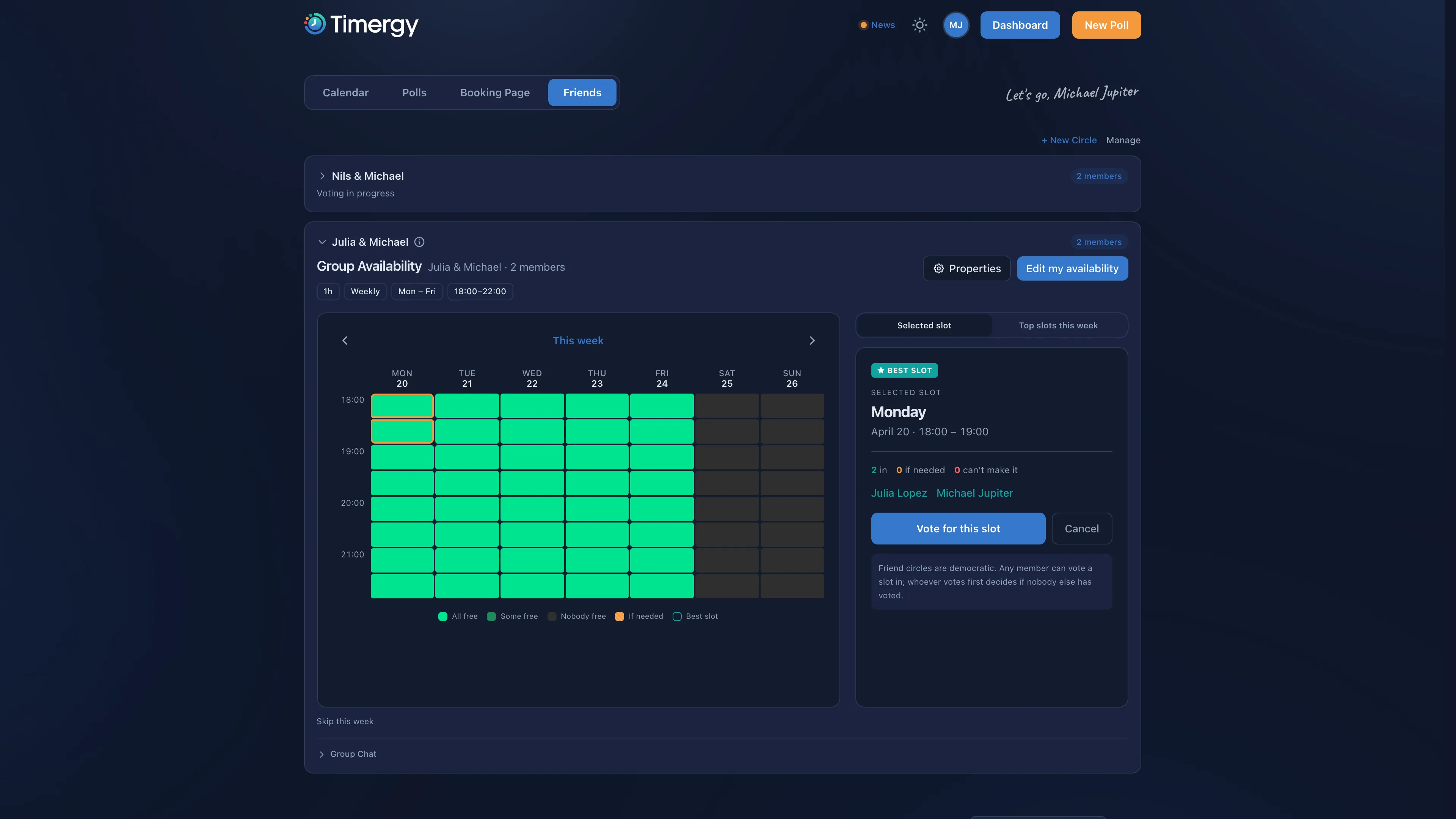
Step 1: Create Your Buddy Group
Open Timergy and tap New Buddy Group. Give it a name (e.g., “Friday Game Night” or “Design Team Lunch”) and invite your members by sharing a link or sending invites directly.
Every member joins with their Timergy account. No account? They can sign up in seconds using Google, Apple, or any of 9 social logins.
Fully free, no member limits. Buddy Groups are not a Pro feature. Any group, small or large, can use every Buddy Group feature at no cost.
Step 2: Connect Calendars
This is where the magic happens. Each member connects their calendar so Timergy can read their availability automatically. Supported providers:
- Google Calendar (OAuth, all calendars synced)
- Microsoft Outlook (Graph API)
- iCloud (app-specific password)
- CalDAV (Nextcloud, Synology, Fastmail, etc.)
- ICS feeds (any calendar URL)
Learn more about all supported providers in the calendar integration guide. The more members connect their calendars, the better the scheduling gets. Timergy never sees event details, only busy/free status. All calendar credentials are encrypted with AES-256-GCM.
Step 3: Read the Availability Heatmap
Once calendars are connected, Timergy generates an availability heatmap for the upcoming week. Each time slot is color-coded:
- Green: Everyone is free
- Yellow: Most members are available
- Red: Major conflicts
The heatmap updates automatically whenever someone’s calendar changes. No manual voting, no reminder messages, no chasing people for responses. This is what makes Buddy Groups a true When2Meet alternative for recurring events.
Step 4: Configure Your Schedule
Multi-Week Cycles
Not every group meets every week. Set your cycle to every 1, 2, 3, or 4 weeks:
| Cycle | Use case |
|---|---|
| Every week | Team standups, game nights |
| Every 2 weeks | Book clubs, hobby groups |
| Every 3 weeks | Extended friend circles |
| Every 4 weeks | Monthly meetups |
Timergy skips the weeks in between and only schedules when it is time.
Host Rotation (Round Robin)
Tired of the same person always organizing? Enable Round Robin host rotation. Timergy automatically rotates who hosts each session. The current host gets a notification and can customize the upcoming meeting, set a location, add a topic, or attach a task list for snacks.
The rotation order is fair and predictable. If someone is absent, they are skipped and host the next round instead.
Minimum Quorum
Set the minimum number of members required for a session to happen. If your group has 5 members, you might set a quorum of 3. If fewer than 3 people are available in a given week, Timergy skips that week and notifies everyone. No more showing up to find out half the group cancelled last minute.
Step 5: Mark Absences
Going on vacation? Have a work trip? Open the Buddy Group and mark yourself as absent for specific weeks. Timergy factors this in immediately:
- Your absence is visible to the group
- The heatmap updates to exclude your calendar
- If you are the scheduled host, the rotation shifts to the next person
- If attendance drops below quorum, the group is notified
You can mark absences weeks in advance for holidays or sick days, so the group always knows what to expect.
Step 6: Weekly Email Digest
Every group member receives a weekly email digest with the upcoming meeting time, who is attending, the current host, and any linked task lists or surveys. Digests are sent in each member’s preferred language (Timergy supports 41). They include an .ics calendar attachment so the event appears in your calendar with one tap.
Democratic Voting
Buddy Groups are designed to be democratic. Every member sees the same heatmap and can confirm the best slot for the upcoming cycle. Whoever votes first locks it in if nobody else chimes in, so scheduling does not stall waiting for a single organizer. If multiple members vote, the group converges on the slot that works for the most people.
No owner-only controls, no admin bottleneck. The group runs itself.
Fully Free, No Member Limits
Buddy Groups are fully free with all features included, no matter how many members your group has. No Pro tier, no per-member scaling, no paywalls on host rotation, quorum, or multi-week cycles. Everything above works for every group, from 2 friends to 30 teammates.
Why Not Just Use a Group Chat?
Group chats are chaos for scheduling. Messages get buried, not everyone replies, and someone always has to manually count responses. A recurring meeting scheduler replaces all of that with a system that runs itself.
Compared to creating a new poll every week, Buddy Groups save you 5-10 minutes of setup time per session. Over a year, that is hours of your life back. Want to see what else makes Timergy different? From survey polls to zero-tracking privacy, there is a lot more under the hood.
Ready to automate your recurring meetup? Create a free Buddy Group and stop asking “When works for everyone?” forever.